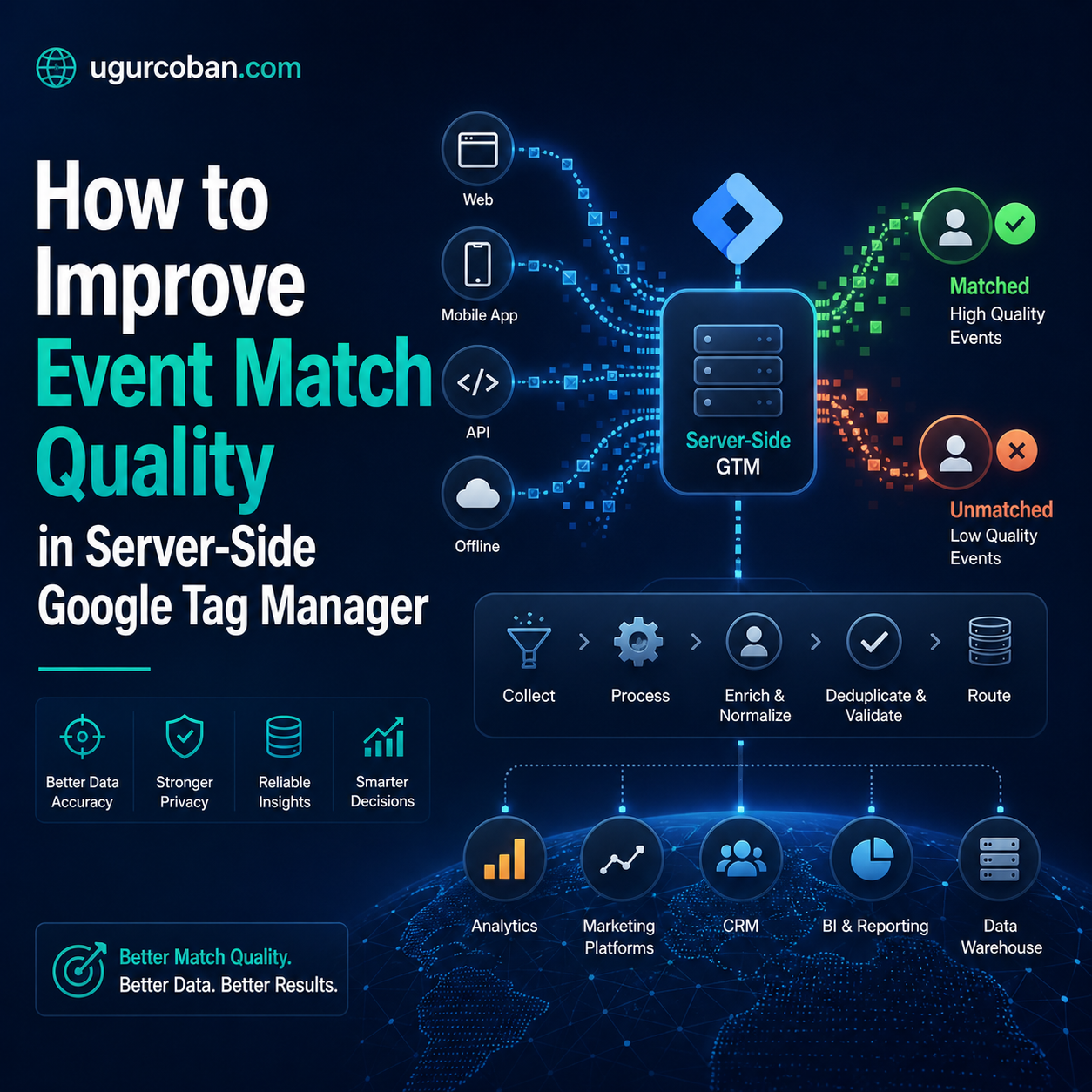
Most server-side GTM implementations score 5 to 6 on Event Match Quality and stay there for months without anyone noticing the optimization cost. The technical setup looks complete, events arrive at the destination, dashboards report no errors, but the matching signal sent to ad platforms is weak. This guide explains why this happens and which configuration decisions move scores into the high range.
Event Match Quality is the metric that quietly determines how well ad platforms can use your conversion data. It rarely shows up in performance dashboards, it does not appear in client reports, and it has no direct line to revenue in any spreadsheet. Yet it controls the floor of how much value your tracking infrastructure delivers to optimization algorithms, and the difference between a 5.0 EMQ score and a 9.0 EMQ score is not cosmetic. It is the difference between Meta’s algorithm finding the right buyers and Meta’s algorithm guessing.
Server-side Google Tag Manager solves a class of tracking problems that browser-side tags cannot, but it introduces its own failure modes. The most common one is teams who deploy server containers correctly, route events through them properly, and still see EMQ scores stuck in the 4 to 6 range. The technical setup looks complete, the events are arriving at the destination, and the dashboards report no errors, but the optimization signal remains weak. The reason is almost always the same. The server tags are missing the user data fields that ad platforms actually use to match events to people, or they are sending those fields in formats that fail validation silently.
This guide walks through the architecture of EMQ in server-side GTM, the diagnostic patterns that reveal what is missing, and the implementation decisions that move scores into the high range without violating consent or introducing maintenance overhead. The framing is platform-agnostic, but the examples lean on Meta’s Conversions API because Meta is where the EMQ metric is most visible and where the consequences of a low score are most measurable.
What Event Match Quality Actually Measures
Event Match Quality is a composite score that ad platforms calculate based on how confidently they can attribute a server event to a specific user. It is not a measure of how many events you send, nor a measure of how complete your event payload is. It is specifically a measure of how well the user identifiers in your event payload allow the platform to match that event to a user already known to its graph.
Meta calculates EMQ on a 0 to 10 scale and bases it primarily on the presence and quality of customer information parameters. Email, phone number, first name, last name, city, state, zip code, country, date of birth, gender, external ID, browser ID (fbp), click ID (fbc), IP address, and user agent each contribute to the score. The score is not a simple sum. It is weighted by how distinctive each field is for matching, and the platform applies diminishing returns to redundant fields. Sending email is more valuable than sending all five name fields combined. Sending fbp and fbc together with a hashed email is more valuable than any single identifier.
Google Ads has its own version of this metric, called something different but conceptually similar. The Enhanced Conversions feature uses customer-provided data that is hashed and matched against Google’s user graph. The match rate that Google reports for an Enhanced Conversion is functionally an EMQ score, and the same architectural principles apply. TikTok’s Events API has a similar matching layer, as does Snap’s Conversions API, and even smaller platforms like Reddit and Pinterest are increasingly building these matching systems into their server-side endpoints.
The architectural insight that ties all of these together is that server-side events are only as valuable as the identifiers attached to them. A purchase event with no user data is essentially anonymous to the platform. The platform knows a purchase happened, but it cannot link that purchase to the ad impression or click that drove it. Optimization works by closing this loop, and EMQ is the measure of how closed the loop is.
The Three Categories of Identifiers
User data fields fall into three categories with very different operational characteristics. Understanding these categories is what allows you to make sensible decisions about which fields to send for which events.
The first category is stable identifiers that persist across sessions and devices. Email address, phone number, and external ID belong here. These are the highest-value fields for matching because they uniquely identify a person regardless of which browser, device, or network they are using. The downside is that these fields are only available for logged-in users, and most ecommerce traffic is not logged in for most of its lifecycle. A first-time visitor browsing your product pages has none of these identifiers attached to them, no matter how well your tracking is configured.
The second category is session identifiers tied to the current browser instance. The fbp cookie that Meta sets on first contact, the gclid parameter that Google appends to ad clicks, the IP address of the connection, and the user agent string all belong here. These identifiers are available for every visitor regardless of login status, but they are also more easily lost. Cookies expire, IPs change, and browsers can clear all of this in a tap. They are valuable specifically because they fill in for the missing stable identifiers on anonymous traffic.
The third category is derived identifiers that the platform computes from session behavior. Browser fingerprinting signals, behavioral patterns, and device graph matching all happen on the platform side. You do not send these directly, but the quality of the session identifiers you do send affects how confidently the platform can derive these.
The matching system uses all three categories together. A purchase event with email plus fbp plus IP plus user agent is far more matchable than a purchase event with email alone, because the additional fields let the platform corroborate the match across multiple signals. Redundancy in identifiers is not waste, it is reliability.
Why Server-Side Setups Often Score Lower Than Browser-Side
A pattern that catches teams off guard is that EMQ scores often drop when teams migrating to Shopify move from browser-side pixel to server-side CAPI. The expectation is that server-side will improve everything, but the initial implementation typically scores worse than the pixel it replaced. Understanding why this happens is the foundation for fixing it.
Browser pixel events automatically include a set of fields that the browser knows about. The fbp cookie is set by the pixel itself and read on every event. The IP address is the actual user IP because the request originates from the user’s browser. The user agent is the browser’s own user agent string. Click ID parameters in the URL are picked up automatically. None of this requires explicit configuration because the pixel runs in the user’s browser and has access to all of this context.
Server-side events do not have this context by default. The server is a different machine in a different network. When the server sends a request to Meta’s CAPI endpoint, the IP address Meta sees is the server’s IP, not the user’s. The user agent is whatever the server’s HTTP library defaults to. The fbp cookie is something the server has to be told about explicitly. Every field that the browser pixel got for free, the server needs to be configured to receive and forward.
The data flow looks like this. The user’s browser fires an event. A web GTM container receives that event and forwards it to the server-side GTM container as a payload. The payload either includes the user identifiers or it does not. The server container receives the payload, applies any transformations, and sends the event to Meta. If the original payload from the web container did not include fbp, IP, and user agent, the server cannot send those fields to Meta even if the server tag template has fields for them.
This means EMQ optimization in server-side GTM is mostly a question of getting the web container to forward the right fields to the server container, and then ensuring the server tag is mapping those fields into the correct destination parameters. A surprising number of “broken” server-side setups are actually broken in the web container’s data forwarding layer, not in the server container itself.
Diagnostic Pattern: Reading the EMQ Breakdown
Before changing any tag configuration, the first step is to understand exactly what is missing. Meta’s Events Manager provides a per-event breakdown that shows which user data fields are present at what coverage rates. This breakdown is the most important diagnostic tool you have, and learning to read it correctly is what separates productive optimization from random experimentation.
The breakdown shows each field and what percentage of events include that field. A typical pattern for an unoptimized server-side setup looks like this. Email is present on 50 to 70 percent of Purchase events because not all customers are logged in at checkout. Phone is present on a similar percentage. IP address shows 100 percent but the IPs are all variations of the server’s IP, which Meta detects and flags as a quality issue. User agent shows 100 percent but the strings are all the server’s HTTP library default. fbp coverage is below 20 percent because the web container is not forwarding it.
Each of these patterns has a specific fix. The IP and user agent issues require the server-side hosting layer to forward the original client headers, which most managed providers offer as an opt-in feature that is easy to miss during initial setup. The fbp coverage issue requires the web container’s data tag to explicitly include the cookie value in the payload sent to the server. The login-dependent fields like email and phone are only fixable to a degree, because they genuinely do not exist for non-logged-in events.
The diagnostic step that most teams skip is comparing per-event coverage rates to identify mismatches. If your Purchase event shows 95 percent email coverage and your AddToCart event shows 30 percent email coverage, the difference is meaningful and tells you something specific about your tag configuration. The Purchase event probably reads email from the checkout form, while the AddToCart event probably reads it from the customer object that only exists for logged-in users. The diagnostic value is in the variance, not the absolute numbers.
A second diagnostic pattern worth running is looking for events flagged with specific quality warnings. Meta’s Diagnostics tab surfaces issues like “duplicate phone numbers across events” or “IP addresses associated with multiple users.” These warnings are not just informational, they directly suppress EMQ scores. A warning about duplicate phone numbers usually means a tag is sending an empty or default phone value that hashes to the same string across events. A warning about IP addresses associated with multiple users almost always means the server’s own IP is being sent instead of the client IP. Each warning has a corresponding fix, and clearing the warnings is often the fastest way to move EMQ scores upward by a meaningful margin.
The fbp and fbc Forwarding Layer
The fbp cookie is Meta’s primary browser-level identifier and arguably the single most important field for EMQ on anonymous traffic. The fbc parameter is its click-derived counterpart, set when a user arrives via a Meta ad with an fbclid in the URL. Together, these two fields give Meta enough signal to match server events to ad impressions and clicks even when the user has not provided personal information.
The fbp cookie is set by the Meta pixel on first contact with a domain. If you have a browser pixel firing on your site, fbp is being set automatically. The cookie persists for 90 days by default and is available to any code running on the same domain. The fbc parameter is set similarly when an ad click brings a user to the site, and it persists for 90 days as well.
In a server-side architecture, the web container needs to read these cookies and pass them in the event payload to the server container. Most server-side GTM templates from managed hosting providers include fbp and fbc as standard fields in their data layer transformation, but it is worth verifying explicitly. The pattern to check is whether the web container’s data tag includes a step that reads _fbp and _fbc cookies and includes them as parameters in the event sent to the server.
On the server side tracking, the corresponding tag needs to map these fields to the user data section of the CAPI request. This is usually a built-in part of the Meta CAPI tag template, but the mapping has to be set explicitly. A common mistake is to leave the user data section blank, expecting the platform to populate it from the event payload automatically. The platform does not. Each field that should appear in the user data must be mapped in the tag configuration.
For events that fire before the fbp cookie has been set, which can happen on very fast page loads or in privacy-restricted browsers, fbp will be empty. This is an unavoidable edge case, but its impact can be minimized by ensuring the pixel script loads as early as possible and by not gating it behind consent decisions for users who have previously consented. If the consent state is already known, the pixel should fire immediately.
IP and User Agent Forwarding
The IP address and user agent string are foundational fields that Meta uses for both matching and quality assessment. Sending the wrong values is worse than sending nothing, because it triggers the “associated with multiple users” warning that suppresses EMQ across all events from the affected source.
The technical issue is that server-side GTM containers run on hosting infrastructure that has its own IP address. When the server forwards an event to Meta, the network layer sees the server’s IP, not the user’s. Without explicit configuration, the server has no knowledge of the original user IP. The fix is for the hosting layer to capture the user IP from the incoming request headers and make it available to the tag as a variable that can be mapped into the user data field.
Different managed hosting providers handle this differently. Stape exposes user IP through a specific event data field called ip_override that requires their User IP Geo Headers Power-Up to be enabled. Other providers like Addingwell and Elevar have their own mechanisms with similar but not identical naming. The pattern is the same across all of them. There is some configuration option that needs to be enabled before user IPs are available, and once enabled, there is a variable in the server container that holds the value.
The server tag then needs to map this variable to the appropriate user data field, which for Meta is client_ip_address. The user agent follows the same pattern, with a corresponding variable holding the original user’s user agent string and a client_user_agent field in the Meta CAPI tag.
A subtle issue worth flagging is that some hosting layers strip or modify these headers depending on the request path. Health check endpoints, batch processing requests, and admin operations might use the server’s own IP and user agent legitimately, and the data forwarding logic needs to distinguish between these and real user traffic. Do not blindly trust that all incoming requests have the right headers attached. The configuration usually handles this correctly out of the box, but it is worth verifying in the diagnostics that the IPs being forwarded look like real client IPs and not all variations of a single internal IP.
The Conditional User Data Pattern
A pattern that significantly improves EMQ scores while reducing duplicate warnings is conditional user data. The principle is simple. Send personally identifiable fields only when they have real values, and exclude them entirely when they would be empty or default.
The problem this solves is that empty fields hash to the same value across all events. If a tag is configured to send email = {{user_email}} and user_email is empty for non-logged-in users, the email field gets sent as an empty string. The empty string hashes to a deterministic value, and Meta sees that same hash across thousands of events. The platform interprets this as the same user appearing thousands of times, which triggers the duplicate warning and suppresses EMQ.
The fix is to omit the field entirely when it would be empty. Server-side GTM supports this through transformations that can remove fields from event data conditionally. The logic looks like this. Check whether a logged-in indicator exists, such as a customer ID or user ID variable. If it does, include the user data fields normally. If it does not, exclude the email, first name, last name, and external ID fields from the event data before the tag fires.
This pattern has a counterintuitive consequence. Your AddToCart and ViewContent events will end up with lower nominal user data coverage, because they will no longer report empty email values. But your EMQ scores will rise, because the events that do include user data are clean and matchable. Removing low-quality data from a payload is often more valuable than adding more data to it.
The conditional logic should be applied to events where the user is unlikely to be logged in, which typically includes top-of-funnel events like PageView, ViewContent, AddToCart, Search, and ViewItemList. Bottom-of-funnel events like InitiateCheckout, AddPaymentInfo, and Purchase happen in contexts where the user has provided their information, and these events should send full user data unconditionally.
A specific implementation note is that the field names in the transformation must match the field names the tag template uses internally, not the display names shown in the GTM interface. This is a common source of confusion. The tag interface might show “Email” as a configurable field, but the underlying parameter name is em or email_address depending on the template. Transformations operate on parameter names, so you need to look at the tag’s data layer documentation or inspect the request payload in preview mode to confirm the correct names.
Event Deduplication and the event_id Strategy
Server-side and browser-side events frequently fire for the same user action. A purchase that completes generates a browser pixel event and a server CAPI event simultaneously. Without explicit deduplication, the platform counts both as separate conversions, which inflates reporting and can disrupt optimization. The solution is the event_id field, which is a shared identifier that lets the platform recognize when two events represent the same underlying action.
Setting up deduplication correctly requires the same event_id to be present in both the browser pixel event and the server CAPI event. Most implementations generate a UUID at the moment the action occurs, store it in a data layer variable, and then both the web container and the server container read it from there. The browser pixel sends it as an event ID parameter, and the server tag sends it as the event_id field in the CAPI payload.
The platform then deduplicates events with matching event_ids that arrive within a configurable time window. Meta’s window is roughly 48 hours by default, which is long enough to handle delayed server-side delivery without missing legitimate matches. When deduplication works correctly, the platform reports each conversion once, and the EMQ score is calculated from the union of identifiers across both versions of the event. The browser pixel’s fbp and the server’s hashed email both contribute to a single, richer event record.
A failure mode to watch for is event_ids that vary between browser and server because the variable is being read at different times or from different sources. If the browser pixel reads the event_id from a checkout form and the server reads it from a webhook payload, the two values might not match. This silently breaks deduplication, and the result is double-counting that gets harder to diagnose the longer it goes uncorrected. The diagnostic check is to compare the count of events reported in Meta against the actual number of conversions in your store. A persistent discrepancy of 50 percent or more usually means deduplication is failing.
For server-side implementations that use webhooks instead of browser-forwarded events, such as Shopify’s order webhooks feeding directly into a server container, the event_id should be the order ID. The order ID is stable, unique, and available in both the browser context (during checkout completion) and the server context (in the webhook payload). Using the order ID as event_id eliminates one entire class of synchronization problems.
Choosing a Hosting Layer
Server-side GTM requires hosting infrastructure that can run the server container, accept incoming HTTP requests from clients, and forward outgoing requests to ad platforms. This can be self-hosted on Google Cloud Platform, but for most teams the operational overhead is not worth the savings. Managed hosting providers handle the infrastructure complexity and add useful features like first-party subdomain routing, automatic scaling, and integrated diagnostics.
The major providers in this space include Stape, Addingwell, and Elevar, each with slightly different feature sets and pricing models. Stape has the broadest feature set and the most extensive integration library, which makes it a common choice for stores that want to start with one provider and add destinations over time. Addingwell focuses on simplicity and predictable pricing. Elevar specializes in Shopify and offers a more opinionated configuration that handles many ecommerce-specific cases out of the box.
When evaluating providers, the criteria that matter most are first-party subdomain routing, IP and user agent forwarding capabilities, request-level logging for debugging, and the ability to manage transformations through a UI rather than only through code. Less important are the specific tag templates available, because those are GTM templates that work the same regardless of which hosting provider runs the container.
A consideration that gets less attention than it should is request volume pricing. Server-side GTM bills on request volume, not on conversion volume, which means high-traffic stores accumulate costs from page views and other top-of-funnel events. Plans that look affordable for small stores can become expensive once event volume scales. Most providers offer auto-upgrade features to prevent silent throttling when limits are hit, and enabling these features is usually the right operational choice.
Self-hosting on GCP is a viable option for teams with infrastructure expertise, but the cost savings are smaller than they appear once monitoring, scaling, and security maintenance are factored in. The managed providers exist because the operational work is real, and most teams underestimate it. Unless you have specific reasons to keep the hosting in-house, a managed provider is the better default.
The Consent Architecture Question
A foundational decision in server-side tracking is how to handle consent. The architectural answer determines what your tracking infrastructure can do and what it must not do, and getting it wrong creates either compliance risk or a serious gap in optimization signal.
The principle that allows server-side tracking to operate independently of browser consent is that server-side data processing falls under a separate legal basis than browser cookie tracking. Browser cookies are governed by ePrivacy regulations that require explicit consent for non-essential tracking, including ad pixels. Server-side processing of customer data for measurement and ad attribution can be operated under legitimate interest, provided the data is appropriately minimized, hashed, and disclosed to users in a privacy policy.
This is not a loophole. It is a deliberate distinction in the regulatory framework, and it is reflected in how the major ad platforms have built their server-side APIs. Meta’s Conversions API documentation explicitly addresses this and provides guidance on operating server-side tracking under consent frameworks like GDPR. The technical implementation needs to align with the legal disclosure, which means the privacy policy must describe what server-side data flows exist and what data is shared with which platforms.
The practical architecture that emerges from this is a hybrid model. The browser pixel is fully consent-gated and does not fire for users who decline cookies. The server-side CAPI runs unconditionally for purchase and other key events, sending hashed user data through a first-party server-side endpoint. Users who consent get tracked through both channels, with deduplication ensuring single counting. Users who decline consent get tracked only through the server-side channel, with reduced but still meaningful signal.
The deduplication layer is what makes this architecture coherent. Without it, consenting users would be double-counted and optimization would be skewed. With it, the two channels combine cleanly into a single conversion record per event. The hybrid model is not a workaround, it is the intended architecture for server-side tracking under modern privacy frameworks.
A specific implementation detail that affects EMQ in this context is that consent state should not be encoded into the event payload sent to ad platforms. The platforms have their own consent tracking layers, and sending consent state as an event parameter does not improve the matching logic. What matters for EMQ is whether the user data fields are present and valid, not whether the user has consented to a specific marketing purpose.
Validating EMQ Improvements in Production
After implementing optimizations, the validation step is where many teams declare success too early. EMQ scores update on a delayed basis, typically over 24 to 72 hours, and the pre-change baseline matters as much as the post-change measurement. A score that rises from 6.0 to 7.5 might look like a 25 percent improvement, but if the underlying event volume changed significantly during the same period, the comparison is not apples to apples.
The right validation pattern is to capture per-event, per-field coverage rates before and after the change, then compare the same time of week one week apart to control for traffic pattern variations. A Tuesday-to-Tuesday comparison is more reliable than a same-day before-and-after, because the user composition and behavior patterns are more similar across the same weekday.
Watch for second-order effects in the diagnostics tab. An EMQ optimization that adds new fields might trigger new warnings if those fields are formatted incorrectly. The most common case is sending raw email instead of hashed email, which most modern templates handle automatically but custom implementations sometimes get wrong. The platform expects SHA-256 hashed values for personally identifiable fields, and sending raw values is both a privacy violation and a quality issue that suppresses the score.
A useful long-tail validation step is to monitor the conversion volume reported in the platform against the actual conversion volume in your commerce backend over a 30-day window. If the numbers stay consistently within a few percent of each other, deduplication is working. If they drift apart, one of the channels is missing events or duplicating them. The drift is the signal that something has broken, and catching it early is what prevents an unnoticed problem from corrupting weeks of optimization data.
Review tools that aggregate EMQ across multiple platforms provide additional value. The Google Tag Manager community templates include several that surface diagnostic information directly in the container interface, which makes routine monitoring less dependent on jumping between platform dashboards. Teams that build EMQ monitoring into their regular tracking review cadence catch issues weeks earlier than teams that wait for performance reports to surface the problems indirectly.
The Optimization Mindset
Event Match Quality is not a setup-and-forget metric. It drifts as platforms update their matching algorithms, as user behavior shifts, and as your own tracking implementation evolves with new features. A score of 8.5 today does not mean a score of 8.5 next quarter, even if nothing in your configuration changed. The platforms tighten their quality criteria over time, and what counted as good a year ago may count as average now.
The teams that maintain high EMQ scores treat tracking quality as an ongoing operational concern, not as a project with a completion date. They review the diagnostics tab monthly, they audit transformations after every significant container change, and they correlate EMQ trends with optimization performance to validate that the score is actually moving the metrics that matter. This discipline is what separates tracking infrastructure that delivers value from tracking infrastructure that exists.
A useful internal frame is to treat EMQ as a leading indicator for ad performance. A drop in EMQ in week one often shows up as a drop in optimization quality in week three, which shows up as weaker performance in week five. The lag is what makes EMQ valuable as a diagnostic. By the time the performance impact is visible in the campaign reports, the underlying cause has been present for weeks. Watching EMQ directly catches problems before they become performance issues, which is significantly cheaper than catching them through the symptom layer.
The work of optimizing EMQ in server-side GTM is not glamorous. It involves reading documentation, testing payloads, validating transformations, and revisiting decisions that were made months ago in light of new platform requirements. But this work is also the work that makes the difference between a tracking stack that supports growth and a tracking stack that quietly limits it. The teams that take this seriously are the teams whose optimization keeps improving while their competitors plateau.
Server-side Google Tag Manager is the foundation of modern ecommerce tracking, but the technology alone does not produce results. The configuration choices that determine EMQ are made in dozens of small decisions across the web container, the server container, the hosting layer, and the destination tags. Each decision is reversible, but the cumulative effect of doing them all correctly is significant, and the cumulative effect of doing several of them wrong is the difference between high-performing and underperforming tracking.
The pattern that connects all of this is that EMQ rewards intentional configuration over default configuration. Defaults work, but they leave most of the available signal on the table. The teams that climb above 8.0 EMQ are the teams that have made deliberate choices about which fields to send, when to send them, how to format them, and how to validate that the formatting survives the path from event to destination.
If there is a single principle to take away, it is that the quality of your conversion data is set in your tracking layer, not in your campaign layer. Better creative, better targeting, and better bidding strategies all amplify the signal you provide, but they cannot create signal that is not there. Investment in EMQ is investment in the maximum performance ceiling of every campaign that uses the data, and the return on that investment compounds across every dollar of ad spend that follows.